
zenity popup messages, windows, dialogs, error messages calendars and more howto on Gnome Linux including Ubuntu, Linux Mint, Centos and more
zenity is a nice utility as part of the gnome window manager that allows you to script from bash and retrieve the input from the user. It could also be helpful in just notifying a user when they login with a popup window.
I'll give an overview of what's available with zenity:
Application Options:
  --calendar                                        Display calendar dialog
  --entry                                           Display text entry dialog
  --error                                           Display error dialog
  --info                                            Display info dialog
  --file-selection                                  Display file selection dialog
  --list                                            Display list dialog
  --notification                                    Display notification
  --progress                                        Display progress indication dialog
  --question                                        Display question dialog
  --warning                                         Display warning dialog
  --scale                                           Display scale dialog
  --text-info                                       Display text information dialog
  --color-selection                                 Display color selection dialog
  --password                                        Display password dialog
  --forms                                           Display forms dialog
  --display=DISPLAY                                 X display to use
A few quick examples:
Note you can even use zenity remotely from an SSH session and make a zenity window popup.
zenity --info  --text="hello" --title="hithere" --display=:0

Gtk-Message: GtkDialog mapped without a transient parent. This is discouraged.
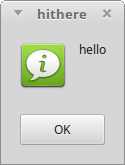
As you can see below I've chosen the "info" dialog type and the text inside it will be "hello" and the title of the window is "hithere" and it is going to show on X Window Display ":0" (the default). The --display portion is only necessary if you have multiple displays or if you are running from a remote SSH session.
Tags:
zenity, popup, dialogs, calendars, howto, gnome, linux, ubuntu, mint, centos, morezenity, utility, allows, bash, retrieve, input, user, notifying, login, ll, overview, calendar, display, dialog, entry, text, info, notification, indication, password, examples, remotely, ssh, quot, hithere, gtk, gtkdialog, mapped, transient, discouraged, ve, default, portion, multiple, displays,