
Avocent 8020 KVM Java Icedtea Viewer
This command in Debian/Ubuntu/Mint will get everything need installed for most Java based KVM viewers:
sudo apt install icedtea-netx
The following additional packages will be installed:
ca-certificates-java icedtea-netx-common openjdk-8-jre openjdk-8-jre-headless
It seems every other updated version of Java or Icedtea breaks things and I will save the frustration of Java for another post.
To fix this error you need to edit the java.security file manually (I recommend updating all in case there is any confusion about what version is being executed):
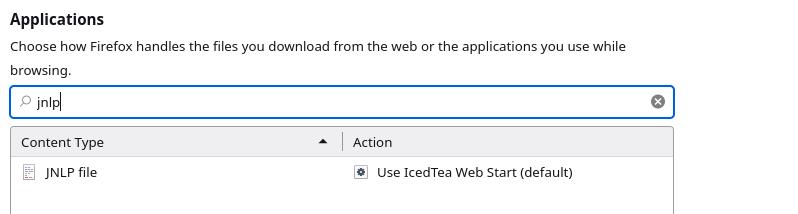
If your browser tries to download the file, make sure that the action for JNLP files is to open with Icedtea
Solution for OpenJDK 11 style.
The difference here is that java.security lives in /usr/lib/jvm/java-11-openjdk-amd64/conf/security/java.security
Do the same edits on the JDK 11 file above ( /usr/lib/jvm/java-11-openjdk-amd64/conf/security/java.security) as we show for JDK Version 8 below.
However, if that doesn't work, you can just comment out all instances that contain "disabledAlgorithms" and that should get it going.
Solution for OpenJDK Version 8 and older
sudo vi /usr/lib/jvm/*/jre/lib/security/java.security
Notice the * (wildcard) this will have vi open up every version's java security for you to change or you could also try the most recent version.
Make the following line look like this:
jdk.tls.disabledAlgorithms=SSLv3, RC4
jdk.certpath.disabledAlgorithms=MD2
After that the error was fixed and finally the KVM viewer worked again (I wish you could just use VNC or other more reliable ways).
*Update - newer versions have a few more config lines you have to fix:
jdk.certpath.disabledAlgorithms=MD2

jdk.jar.disabledAlgorithms=MD2

jdk.tls.disabledAlgorithms=SSLv3, RC4
Errors that you will get before solving this problem:
net.sourceforge.jnlp.LaunchException: Fatal: Launch Error: Could not launch JNLP file. The application has not been initialized, for more information execute javaws/browser from the command line and send a bug report.
at net.sourceforge.jnlp.Launcher.launchApplication(Launcher.java:580)
at net.sourceforge.jnlp.Launcher$TgThread.run(Launcher.java:936)
Caused by: java.lang.reflect.InvocationTargetException
at sun.reflect.NativeMethodAccessorImpl.invoke0(Native Method)
at sun.reflect.NativeMethodAccessorImpl.invoke(NativeMethodAccessorImpl.java:62)
at sun.reflect.DelegatingMethodAccessorImpl.invoke(DelegatingMethodAccessorImpl.java:43)
at java.lang.reflect.Method.invoke(Method.java:498)
at net.sourceforge.jnlp.Launcher.launchApplication(Launcher.java:574)
... 1 more
Caused by: java.security.AccessControlException: access denied ("java.util.PropertyPermission" "user.name" "read")
at java.security.AccessControlContext.checkPermission(AccessControlContext.java:472)
at java.security.AccessController.checkPermission(AccessController.java:884)
at java.lang.SecurityManager.checkPermission(SecurityManager.java:549)
at java.lang.SecurityManager.checkPropertyAccess(SecurityManager.java:1294)
at java.lang.System.getProperty(System.java:717)
at com.avocent.lib.gui.ShowDuplicateApp.
at com.avocent.video.Stingray.
at com.avocent.video.Stingray.launch(Unknown Source)
at com.avocent.video.Stingray.main(Unknown Source)
... 6 more
net.sourceforge.jnlp.LaunchException: Fatal: Initialization Error: Could not initialize application. The application has not been initialized, for more information execute javaws from the command line.
at net.sourceforge.jnlp.Launcher.createApplication(Launcher.java:822)
at net.sourceforge.jnlp.Launcher.launchApplication(Launcher.java:531)
at net.sourceforge.jnlp.Launcher$TgThread.run(Launcher.java:945)
Caused by: net.sourceforge.jnlp.LaunchException: Fatal: Application Error: Cannot grant permissions to unsigned jars. Application requested security permissions, but jars are not signed.
at net.sourceforge.jnlp.runtime.JNLPClassLoader$SecurityDelegateImpl.getClassLoaderSecurity(JNLPClassLoader.java:2481)
at net.sourceforge.jnlp.runtime.JNLPClassLoader.setSecurity(JNLPClassLoader.java:385)
at net.sourceforge.jnlp.runtime.JNLPClassLoader.initializeResources(JNLPClassLoader.java:806)
at net.sourceforge.jnlp.runtime.JNLPClassLoader.
at net.sourceforge.jnlp.runtime.JNLPClassLoader.createInstance(JNLPClassLoader.java:421)
at net.sourceforge.jnlp.runtime.JNLPClassLoader.getInstance(JNLPClassLoader.java:495)
at net.sourceforge.jnlp.runtime.JNLPClassLoader.getInstance(JNLPClassLoader.java:468)
at net.sourceforge.jnlp.Launcher.createApplication(Launcher.java:814)
... 2 more
Tags: